
Working hours, crystal balls, and the quiet joy of not updating things manually — say hello to Sense HR v5.0
Sense HR v5.0 introduces smarter working hours management, faster planner setup, clearer event approval visibility, improved people search, smoother reporting, and reliability fixes — all designed to help HR teams reduce manual admin and keep employee data accurate.
There are few moments in HR quite as thrilling as realising that someone’s working hours are changing next Tuesday.
And by thrilling, we mean the kind of thrill you get when you hear a strange noise from the boiler, notice your phone battery is on 1%, or remember… at 10:47pm… that you were supposed to update someone’s holiday entitlement three days ago.
Because working hours changes should be simple, shouldn’t they?
Someone moves from five days to four. Someone starts compressed hours. Someone goes part-time after returning from leave. Someone joins next month and needs everything ready before they arrive. Simple.
Except, traditionally, these “simple” changes have had a habit of turning into a tiny administrative escape room.
You update the working hours. Then you check the planner. Then you check entitlement. Then you check future bookings. Then you check whether the public holidays still make sense. Then someone asks why their balance looks wrong and suddenly you’re staring at your screen like it has personally betrayed you.
Well, good news.
Sense HR v5.0 has arrived, and it’s here to take several of those little jobs, line them up neatly, give them a packed lunch, and send them off to sort themselves out.
Working hours changes, without the last-minute scramble
Let’s start with the big one.
Administrators can now schedule working hours changes in advance.
Yes. In advance.
Not “log in on the morning the change takes effect and hope nobody interrupts you”. Not “set a calendar reminder called UPDATE JAMES HOURS DO NOT FORGET” and then forget anyway because someone asked you an urgent question about a missing payslip, a lost clock-in tag, or whether alpacas count as dependants.
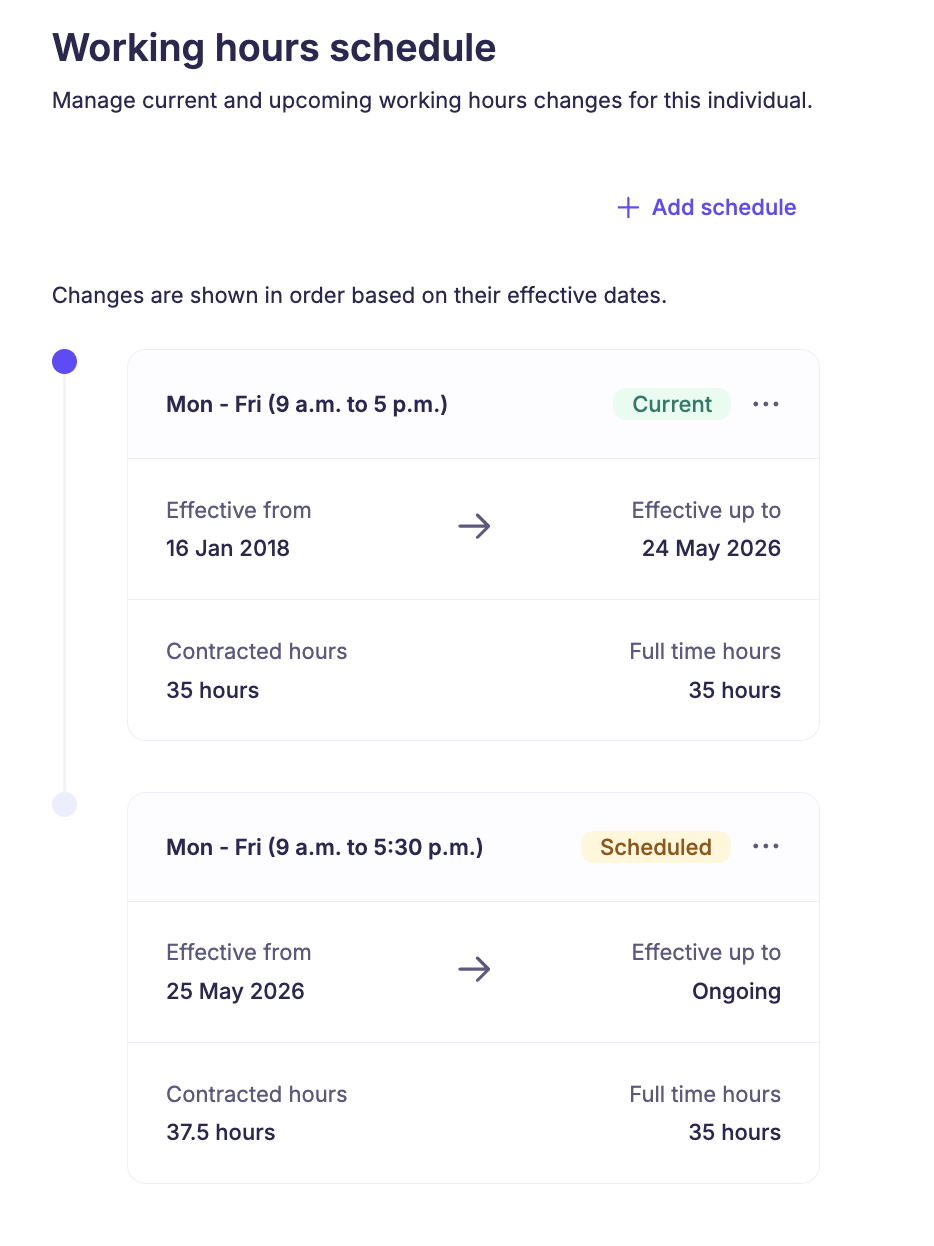
Now, you can add a future-dated working hours change, and Sense HR will apply it automatically on the correct effective date.
The system shows current and future working hours in one timeline view, so you can see what applies now and what’s coming next. It’s not quite a crystal ball — sadly, it won’t tell you who’s going to be off sick the Friday before a bank holiday weekend, although our handy absence heatmap can give you some clues in that department — but it does give you a clearer view of scheduled changes before they happen.
And before you save anything, you can review the impact.
If future bookings could be affected, they’ll be flagged for review. Entitlement is recalculated from the updated working hours too, helping to keep leave balances accurate.
In other words: fewer manual updates, fewer entitlement mysteries, and fewer moments where someone in HR whispers, “Why is this happening?” into a lukewarm cup of tea.
Planner setup that does more of the thinking for you
Next up: planner setup.
Historically, setting up planners has been one of those tasks that sounds calm and orderly — like arranging books alphabetically or putting matching socks into drawers — but can quickly become surprisingly fiddly.
Start date. Working hours. Entitlement. Current period. Upcoming period. Public holiday rules. Is the person starting mid-week? Are they part-time? Are they full-time? Are they mostly full-time but not on Thursdays because Thursday is pottery day?
You get the idea.
Sense HR v5.0 makes planner setup faster, clearer, and much easier to get right from day one.
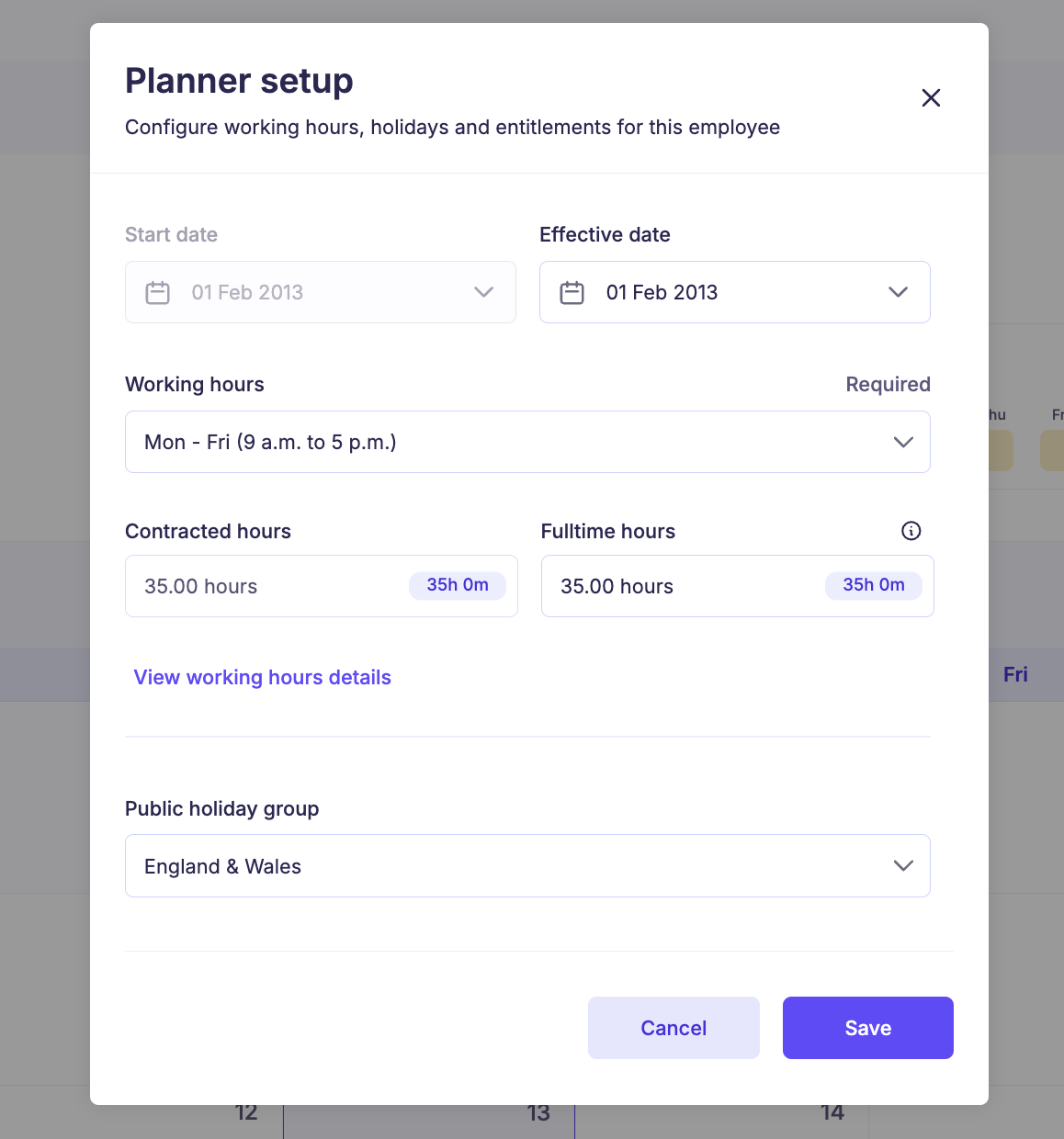
Planner settings are now pre-filled using global settings and the employee’s start date. Entitlement is automatically calculated for the current and upcoming periods, and users can see how the calculation has been worked out.
That last bit is important.
Because nobody likes a mysterious number in HR.
A mysterious number in a treasure hunt? Fine. A mysterious number on a winning lottery ticket? Lovely. A mysterious number in holiday entitlement? Absolutely not.
With v5.0, changes to working hours or key planner settings are reflected in real time, so administrators can check setup accuracy before saving. Employee status and next shift visibility have also been improved, giving employees and managers a clearer view of availability.
It’s cleaner. It’s clearer. It’s much less “let’s hope this is right” and much more “yes, there it is, that makes sense”.
Pending approvals can stop hiding in plain sight
There’s a special kind of workplace chaos caused by things that are technically visible but not visibly visible.
Pending approvals are exactly the sort of thing that should not require detective work.
So, Sense HR v5.0 improves event booking visibility across the planner, company calendar, and dashboard.
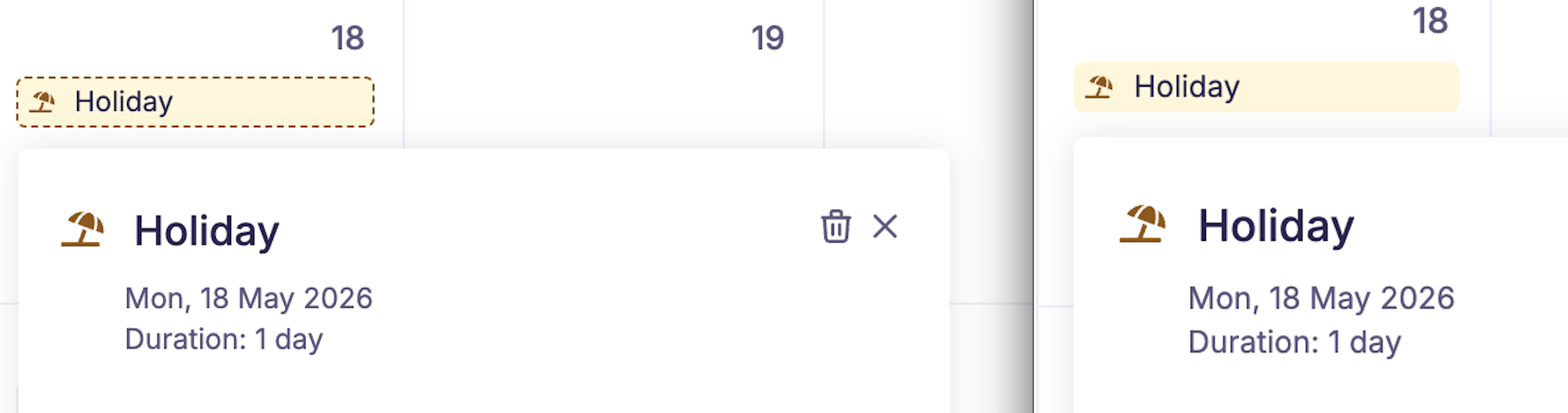
Events awaiting approval are now highlighted more clearly, using consistent visuals aligned with the Company Calendar. This also applies to dashboard widgets, which means managers and administrators can identify pending approvals at a glance.
No screen-hopping. No “I’m sure I saw it somewhere”. No opening seventeen different areas just to confirm whether something is approved, pending, or quietly plotting.
Just clearer status visibility, exactly where people need it.
People search now understands what people are actually called
Formal names have their place.
They belong on contracts, passports, bank forms, and those envelopes from very official organisations that make you nervous even when you’ve done nothing wrong.
But day to day? People often go by something else.
Robert is Rob. Elizabeth is Liz. Mohammed is Mo. Geraldine Gray is Gigi. Christopher is “please never call me Christopher unless I’m in trouble”.
And until systems understand that, people search can be oddly unhelpful. You type the name everyone uses, the system stares back blankly, and for a moment you wonder whether the person you’ve worked with for three years was, in fact, a collective hallucination.
Sense HR v5.0 now supports “Known As” names in people search, alongside existing fields like name, email, department, and location.
It’s a small improvement with a very human impact. Because HR software should reflect the way people actually work together, speak to each other, and find each other… not just the way names appear in legal documentation.

Reporting gets smoother, because reporting should not feel like furniture assembly
Reports are brilliant.
Reports give you answers. They help you spot patterns. They turn “I think” into “I know”, which is basically the HR equivalent of upgrading from a candle to a floodlight.
But only if they’re easy to work with.
If editing, saving, publishing, filtering, or updating report data feels clunky, people understandably begin to treat reports like flat-pack furniture: useful in theory, but emotionally demanding in practice.
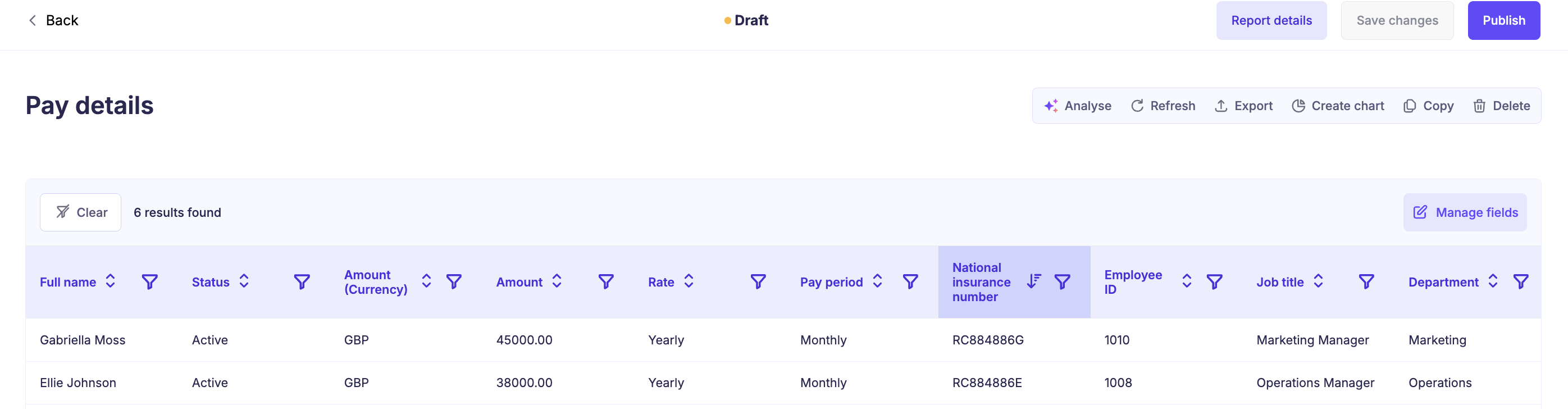
Sense HR v5.0 improves the reporting experience so reports feel faster, smoother, and easier to manage.
The workflow for editing, saving, and publishing changes has been streamlined. Updating filters, fields, and report data is more intuitive, with clearer feedback throughout the process. The Analyse with AMI experience has also been improved, making it smoother to work with report data.
That means fewer interruptions, fewer moments of “did that save?”, and more confidence when making changes.
The useful little fixes
No release would be complete without the smaller fixes that quietly make life better.
Company documents are now marked as “Read” when downloaded, aligning that behaviour with the employee profile record.
There have also been reliability improvements to To Dos reports, especially those including the Assignee field. These now load more reliably, with improved performance and fewer timeout issues.
So, what does Sense HR v5.0 really mean?
On paper, Sense HR v5.0 is about working hours, planner setup, event visibility, people search, reporting, and reliability improvements.
And yes, technically, that’s true.
But really, it’s about something much more useful than a list of features.
It’s about giving HR teams fewer loose ends to chase.
It’s about making future changes easier to plan before they become today’s problem. It’s about entitlement calculations that are clearer and more accurate. It’s about planners that are easier to set up. It’s about managers seeing what needs attention without going on a scavenger hunt. It’s about finding people by the names they actually use. It’s about reports that feel less like a chore and more like a proper power tool.
In short, it’s about removing small frictions before they become big frustrations.
And that’s where good HR software should shine.
Not by making a huge theatrical entrance complete with fireworks, marching bands, and spark machines… although we’re not ruling that out for a future release… but by quietly making everyday work feel easier, clearer, and more reliable.
Because HR teams have enough to do without manually updating working hours at exactly the right moment, decoding holiday entitlement like ancient runes, or trying to remember what Elton’s passport name is.
… It’s Reginald, by the way 🤷♂️.
Sense HR v5.0 is here to help with all of that.
No crystal ball required.
FAQs
Sense HR v5.0 includes improvements to working hours management, planner setup, event visibility, people search, reporting, and reliability. The release is designed to reduce manual admin, make entitlement calculations clearer, and help HR teams manage day-to-day changes with more confidence.
Yes. Administrators can now add future-dated working hours changes, and Sense HR will apply them automatically on the correct effective date. Current and future working hours are shown in one timeline view, making upcoming changes easier to review and manage.
Yes. When working hours are updated, entitlement is recalculated from the new working hours. This helps keep leave balances accurate and reduces the risk of manual entitlement errors.
Planner settings are now pre-filled using your organisation’s global settings and the employee’s start date. Entitlement is calculated automatically for the current and upcoming periods, and administrators can see how the calculation has been worked out before saving.
Yes. People search now supports “Known As” names, alongside existing fields such as name, email, department, and location. This makes it easier to find employees by the names they commonly use at work.
Reporting has been improved to feel faster, smoother, and easier to manage. Editing, saving, publishing, updating filters, and working with report data are now more streamlined. The Analyse with AMI experience has also been improved.



